


Introducing scopes for smaller and more optimized datafiles
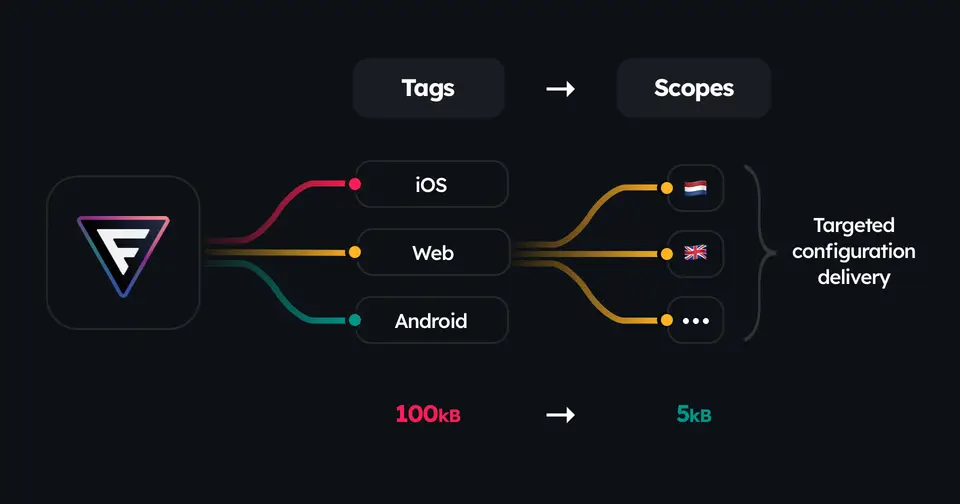
With scopes you can now create more tailored datafiles against partially known contexts beforehand. Resulting in significantly smaller datafiles that are faster to load, parse, and evaluate values from in your application runtime.
TL;DR: read full API documentation here.
Who you are#
You are a product engineering organization with:
- Products that span multiple platforms (Web, iOS, Android)
- Global products with features specific to each country
- SaaS products with tiered subscriptions
- Enterprise products with access based on roles, or
- All of the above!
The challenges you face#
Before you know it, you have:
- Your iOS app downloading feature configurations for Web and Android
- Your premium users receive rules for free tier features
- Your US app includes targeting logic for 50+ other countries
The unfortunate byproduct of your success in growth leads to bloated datafiles, slower load times, and unnecessary rules to go through in your applications.
The solution#
Enter scopes that let you produce targeted, lightweight datafiles by applying partially known context upfront.
- Already know your user is coming from a browser? Create a scoped datafile that excludes all iOS/Android rules.
- Know they are a premium subscriber? Remove free tier configurations.
- Know their country? Eliminate irrelevant geographical targeting rules.
- All of the above? Create scoped datafiles against a bigger context.
Practical impact#
- 70-90% smaller datafiles for mobile apps (they only get mobile specific rules)
- Faster app startup with less data to download and parse
- Reduced bandwidth costs, which is especially critical for global users
- Simpler debugging with smaller, focused datafiles
- Better performance, especially on slower networks
How it works#
In your project configuration file, you define new scopes:
module.exports = { environments: ["production"], tags: ["web", "ios", "android"], scopes: [ { name: "browsers", tag: "web", context: { platform: "web" } } ],}Above configuration tells Featurevisor to:
- Create an additional scoped datafile named
browser - By picking features tagged against
web - Removing any redundant rules and segments after applying partially known provided
context
Build output#
You run the same command for building datafiles like before:
$ npx featurevisor buildAnd you will notice the output similar to this below:
datafiles/├── production/│ └── featurevisor-scope-browsers.json│ └── featurevisor-tag-web.json│ └── featurevisor-tag-ios.json│ └── featurevisor-tag-android.jsonNotice the new featurevisor-scope-browser.json file. This datafile contains only rules specific to browsers, removing any rules and segments that are not needed.
Consuming scoped datafiles#
Nothing changes from your application side using Featurevisor SDKs.
You would just point to a different URL for fetching scoped datafile instead of the previous tagged datafile. That's it.
Prepared for hyperscale growth#
With Featurevisor, your product engineering organization is now prepared for hyperscale growth and it won't even break a sweat.
We are in the new era of vibe coding where Product is closer to Engineering than ever before. Featurevisor can be that bridge that keeps both sides in sync for complex configurations with Git as the single source of truth.
Useful links#
- API docs for scopes
- Tagging features
- Project configuration
- Building datafiles
- Namespaces for hierarchical organization
Watch the project on GitHub for more updates: https://github.com/featurevisor/featurevisor.